Plan prices checked 7 October 2026; other details carry the earlier dates listed in Sources. Based on public supplier documentation, not hands-on product testing.
Podia pricing in the UK is refreshingly easy to read. Three plans, clear limits, one transaction fee on the cheapest tier. So why do so many creators end up on the wrong one?
Usually it's because they compare the subscription prices and stop. The real decision sits in three places most people don't look: a 5% fee that grows with your sales, an email allowance that's smaller than you'd expect, and a handful of tools that only unlock on the middle plan.
Get those three right and the choice almost makes itself. This guide walks through each one, with worked numbers, so you can pick the plan that fits now and still makes sense when your business grows.
Podia's Three Plans at a Glance: Prices, Fees and Limits
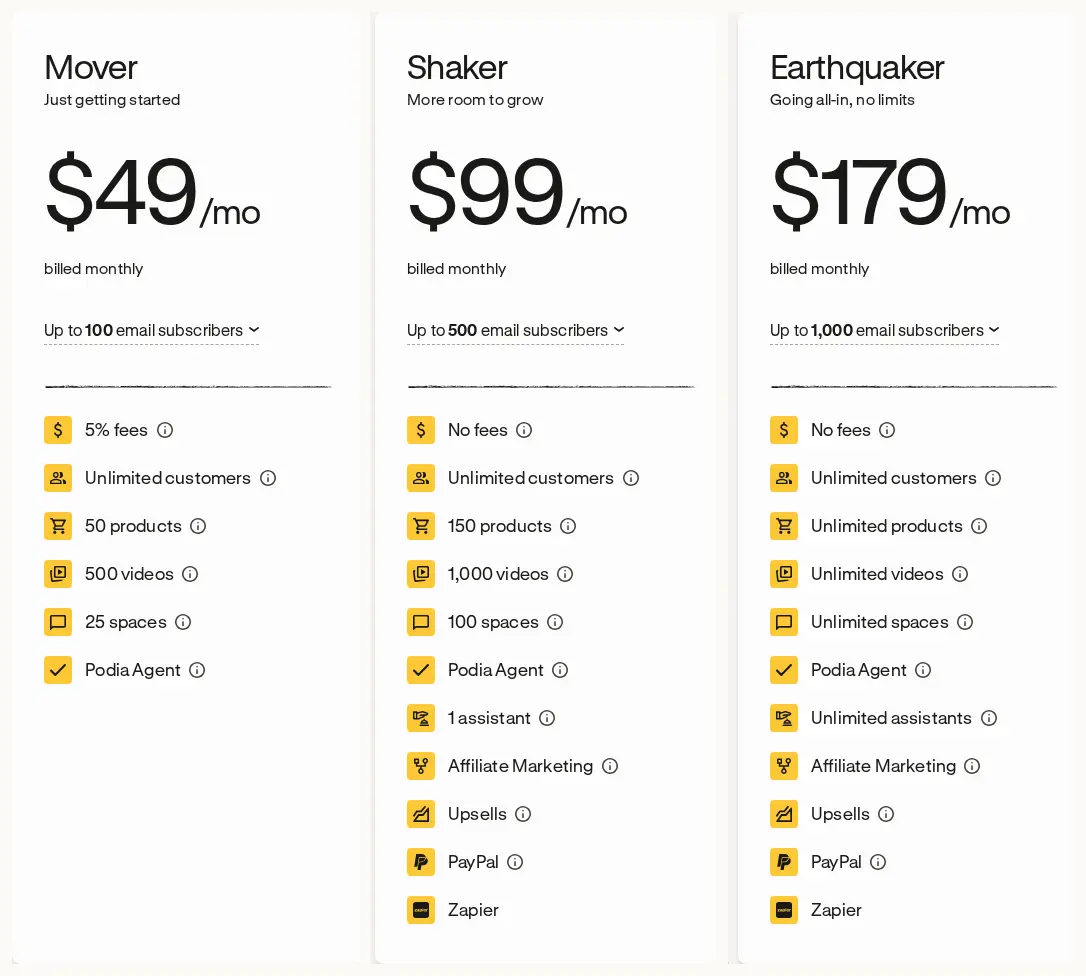
Here's what Podia's official pages showed on 7 October 2026. Prices are in US dollars.
| Plan | Monthly billing | Annual billing | Podia transaction fee | Email contacts included | Products / videos / spaces | Assistants |
|---|---|---|---|---|---|---|
| Mover | USD 49 a month | USD 504 a year (shown as USD 42/month) | 5% of each sale | 100 | 50 / 500 / 25 | None |
| Shaker | USD 99 a month | USD 1,008 a year (shown as USD 84/month) | None | 500 | 150 / 1,000 / 100 | 1 |
| Earthquaker | USD 179 a month | USD 1,800 a year (shown as USD 150/month) | None | 1,000 | Unlimited | Unlimited |
All plans are presented as including online courses, digital downloads, coaching, events, community, a website, custom domain support, a blog, landing pages, built-in checkout, migration help, and email and chat support.
Shaker and Earthquaker also list affiliate marketing, upsells, PayPal and Zapier. The pricing table doesn't list those for Mover.
Podia's plan-limits article says limits can't be exceeded. If you need more than your plan allows, you upgrade. It also warns that older, legacy plans may differ, so if you've been on Podia a while, check your own account.
Want to follow along with your own figures? Download the editable Podia cost-input worksheet (CSV). It keeps sourced facts, your own inputs and unknowns in separate rows so nothing quietly becomes zero.
Before Price: The Feature Gates That Pick Your Podia Plan for You
Here's the thing most Podia comparisons miss. For a lot of creators, revenue never gets a vote. A single feature decides the plan before any maths happens.
Ask yourself these four questions:
- Do you need anyone else to log in and help? Mover has no assistants. Shaker has one.
- Do customers want to pay by PayPal? PayPal is listed on Shaker and above.
- Do you rely on Zapier to connect tools? Zapier is listed on Shaker and above.
- Do you want affiliates promoting you, or upsells at checkout? Both listed on Shaker and above.
If you answered yes to any of those, Shaker is your starting point, whatever you sell. The fee break-even later in this guide doesn't apply to you, because Mover was never really an option.
When capacity, not features, forces the upgrade
The other gate is size. Mover covers 50 products, 500 videos and 25 community spaces. That's plenty for most solo creators starting out.
But think about the next 12 months, not today. If you plan to add a course a month with 40 lesson videos each, you'll hit the 500-video ceiling sooner than you'd think. Mover's limits need to cover your plans for the whole year, or you'll be upgrading mid-launch.
Earthquaker becomes the minimum when Shaker's 150 products, 1,000 videos, 100 spaces or single assistant won't stretch far enough.
The Hidden Detail in Podia's Assistant Access
This deserves its own section because it surprises people.
Podia's help page says assistants have full access to products, emails, community features and site settings. They can't manage billing, change plan details or cancel the account. Everything else is open to them.
So "one assistant" on Shaker isn't a narrowly permissioned tutor who can only see one course. It's closer to a second owner who can't touch the credit card.
That's perfectly fine if your assistant is a trusted VA running your whole operation. It's less ideal if you want a guest tutor to answer questions in one cohort without seeing your email list or editing your sales pages.
If tightly limited staff access matters to you, keep Podia's fit as "conditional" until you've seen a role that does what you need. And don't share your own login as a workaround. That gives away even more.
Our learning community platform checklist shows how to test staff roles safely before you buy.
Monthly or Annual Podia Billing: Read the Cash, Not the Monthly Figure
Podia's annual cards show a per-month figure, but you don't pay monthly. You pay the annual total in one go. Podia's pricing page says to request a refund within 72 hours of the most recent payment; it does not offer partial annual refunds. Its migration help says no portion of the plan payment can be refunded once migration work begins, with no exceptions. Confirm this before authorising the work.
| Plan | 12 monthly payments | One annual payment | Annual saving |
|---|---|---|---|
| Mover | USD 588 | USD 504 | USD 84 |
| Shaker | USD 1,188 | USD 1,008 | USD 180 |
| Earthquaker | USD 2,148 | USD 1,800 | USD 348 |
Two practical points for UK buyers:
- Annual billing converts your dollars to pounds once. Monthly billing converts twelve times, so your sterling cost wobbles with the exchange rate.
- If you're only planning six months ahead, annual Mover still takes USD 504 from your account on day one. You might mentally "allocate" USD 252 to those six months, but the full amount has still left the bank.
If Podia shows a different total in your checkout, use that figure. Save the date, currency and amount.
Podia Email Contacts: The Small Allowance That Changes Everything
Here's where Podia pricing gets interesting, and where the standard break-even advice falls apart.
Mover includes just 100 email contacts. Shaker includes 500. Earthquaker includes 1,000. If you've been building a list for any length of time, 100 is tiny.
Podia's pricing page has a contact selector showing extra monthly amounts. For Mover, examples include:
| Contacts | Extra cost |
|---|---|
| 500 | +USD 10 |
| 1,000 | +USD 18 |
| 2,500 | +USD 28 |
| 5,000 | +USD 45 |
| 10,000 | +USD 70 |
The pricing page says Podia warns you as you approach a limit and won't automatically upgrade you. That's good for budgeting, though we haven't tested it ourselves.
How your list size quietly moves the Mover vs Shaker break-even
Watch what happens with a list of 500 people.
On Mover, you'd pay USD 49 plus USD 10 for 500 contacts, so USD 59 a month. Shaker already includes 500 contacts at USD 99. The gap between the two plans shrinks from USD 50 to USD 40.
And a smaller gap means Shaker pays for itself sooner. Instead of breaking even at USD 1,000 a month in sales, it now breaks even at USD 800 (USD 40 divided by 5%).
So the "USD 1,000 rule" you'll see quoted everywhere only holds if your list fits inside Mover's 100 contacts. Grow your list and the line moves.
Podia Mover vs Shaker: The 5% Fee Break-Even, Step by Step
Podia's fee help page says Mover is charged 5% on each sale, deducted from the sale amount. Shaker and Earthquaker remove that fee. Stripe or PayPal still charge their own processing fees on every plan.
Let's work out the simple version first. The assumptions:
- both plans meet all your needs
- your list fits within 100 contacts, so no email add-on
- monthly billing
- every sale carries the 5% Mover fee
- refunds and tax are left out
- processing fees are the same on both plans, so they cancel out
Where the lines cross: USD 1,000 a month
Shaker costs USD 50 more a month than Mover (USD 99 minus USD 49).
USD 50 divided by 5% = USD 1,000 in monthly sales.
Here's how that plays out:
| Monthly sales | Mover (USD 49 + 5%) | Shaker (USD 99) | Cheaper plan |
|---|---|---|---|
| USD 500 | USD 74 | USD 99 | Mover by USD 25 |
| USD 1,000 | USD 99 | USD 99 | Tie |
| USD 2,000 | USD 149 | USD 99 | Shaker by USD 50 |
On annual billing: USD 840 a month
On annual billing, the two plans tie at USD 10,080 of sales across 12 months. That's about USD 840 a month if your sales are steady.
Above that, Shaker costs less on this narrow plan-only view.
The launch-business twist
If you sell in launches, don't use your launch month to decide. Use your yearly total.
Picture a creator who takes USD 6,000 in one launch month and about USD 300 in each of the other eleven. That launch month feels huge, and it's tempting to upgrade straight away. But the year adds up to USD 9,300.
On monthly billing, the yearly tipping point is USD 12,000 (twelve times USD 1,000). On annual billing, it's USD 10,080. This creator sits below both, so Mover still comes out cheaper across the year, even though Shaker would have won the launch month on its own.
Do your own sum with your real numbers rather than gut feel.
The maths here was checked with executable calculation tests at the boundary points. But remember: it stops being useful the moment one plan can't do something you need.
Card Processing: The Cost That Sits Under Every Podia Plan
Podia says payment-processor fees are separate and can vary by location.
For reference, Stripe's UK standard pricing page (checked 23 September 2026) lists 1.5% + 20p for standard UK cards and 2.5% + 20p for EU cards. Those are Stripe's public rates, not a guaranteed total for every Podia account.
A few things to watch:
- The 20p is per successful charge. Ten big payments cost less in fixed fees than a hundred small ones of the same total.
- Don't mix Stripe's sterling fee with Podia's dollar subscription in one figure without stating an exchange rate.
- Refund, dispute and currency-conversion costs depend on your own payment agreement, so leave them as unknowns until you've checked.
Processing doesn't change the Mover vs Shaker break-even (it's the same on both), but it absolutely belongs in your total budget.
"Free Migration" on Podia: What's Included and What You'll Rebuild
Podia's pricing page says migration help is included, covering up to 50 products on Mover and 150 on Shaker and Earthquaker. It lists course and download content, customer emails for those products, and free community and membership subscribers among what it moves.
Now the important bit. Podia's switching page says active paying subscriptions cannot be moved. Recurring plans must be set up afresh.
Think about what that means in practice. Every paying member on your old platform needs to sign up and enter their card again on Podia. Some won't. That's not a Podia flaw specifically (it's common when moving payments between systems), but it's a real cost in time, emails and possibly lost members.
Podia's help article also says tests or quizzes, pipelines and site pages are not migrated, and a paid plan is required.
So budget for:
- overlap months paying for both platforms
- emails asking members to re-subscribe
- rebuilding quizzes, funnels and pages
- redirects, domain work and reconnecting integrations
Our course platform migration checklist helps you list every record before you move.
Podia in Pounds: Currency and VAT Without the Guesswork
Podia's public prices are in US dollars. Here's how to budget sensibly:
- For past payments, use the actual sterling amount on your bank or card statement, plus any conversion fee.
- For future budgets, pick and date an exchange rate source, add any card markup, and run a low and high scenario.
- Save every invoice and check whether tax was charged.
- Ask your accountant how VAT, any reverse charge and any recovery apply to your business. Keep "VAT paid" and "VAT recoverable" as separate lines.
We haven't given a sterling conversion or tax figure here on purpose. Both depend on facts the pricing page can't tell us.
Which Podia Plan Covers What Your Business Needs?
Mover tends to fit if:
- you're a solo creator who doesn't need anyone else logging in
- your products, videos and spaces stay well within 50, 500 and 25
- your list is small, or you're happy to pay for an email add-on
- your monthly sales are below the break-even for your list size
- you don't need PayPal, Zapier, affiliates or upsells
Shaker tends to fit if:
- you need one assistant, PayPal, Zapier, affiliates or upsells
- you're selling above the break-even
- you need more room than Mover allows
Earthquaker tends to fit if:
- you've outgrown Shaker's capacity
- you need more than one assistant
- you want the 1,000 included email contacts and can handle USD 1,800 upfront on annual billing
Pause and get answers first if you need narrowly limited tutor roles, a specific assessment or reporting workflow, guaranteed migration of active subscriptions or learner history, a confirmed sterling price, or a settled VAT position.
Use our course platform requirements checklist to test quizzes, certificates and reporting before you commit.
Choose Your Podia Plan in This Order
- Write down your must-haves: teaching, community, payments, email, staff and exports.
- Mark each plan suitable, conditional or unsuitable against Podia's current pages.
- Pick the lowest suitable plan.
- Add your email tier and recalculate the break-even.
- Add processing fees using your real payment route.
- Add exchange rate, VAT, replacement tools and your own time.
- Run your migration and exit checks before paying annually.
Once you've found a suitable plan, compare it with other platforms using our UK course platform cost calculator.
Podia Pricing UK: Quick Answers
How much is Podia in the UK?
Podia prices in US dollars. Mover is USD 49 a month, Shaker USD 99 and Earthquaker USD 179 on monthly billing. Annual totals are USD 504, USD 1,008 and USD 1,800. Your bank converts to pounds.
What is Podia's 5% fee?
It's Podia's transaction fee on the Mover plan, deducted from each sale. Shaker and Earthquaker have no Podia transaction fee. Card processing fees still apply on all plans.
When is Shaker cheaper than Mover?
If both plans fit and your list stays within 100 contacts, Shaker is cheaper above USD 1,000 a month in sales on monthly billing, or USD 840 a month on annual billing. At 500 subscribers, the demonstrated Mover email add-on lowers that threshold. At other list sizes, price both plans and recalculate the difference.
Does Podia's free migration move paying members?
No. Podia says active paying subscriptions can't be moved and recurring plans must be set up again.
What can a Podia assistant see?
Podia says assistants have full access to products, emails, community and site settings, but can't manage billing, change the plan or cancel the account.
Is Podia worth it for a UK creator?
It can suit creators who want courses, email, website and community in one place. Whether it's worth it depends on which plan you need, your sales level and your email list size.
More UK Pricing Guides
- Podia vs LearnWorlds. How Podia compares with a more learning-focused platform.
- Teachable pricing UK. A similar fee-versus-subscription trade-off on Teachable.
- UK buyer guides. All our UK buying guides.
Sources
Plan prices, limits and Podia transaction fees were rechecked against Podia's official pages on 7 October 2026. Add-on, assistant and migration details keep their earlier source dates and should be rechecked before purchase. This page contains no affiliate links.
- Podia pricing: https://www.podia.com/pricing
- Podia Help Center, Understanding Podia transaction fees (dated 18 May 2026): https://help.podia.com/en/articles/11371138-understanding-podia-transaction-fees
- Podia Help Center, Understanding Podia plan limits (dated 31 July 2026): https://help.podia.com/en/articles/15350975-understanding-podia-plan-limits
- Podia Help Center, Managing assistants: https://help.podia.com/en/articles/11370992-managing-assistants
- Podia switching page: https://www.podia.com/switch
- Podia Help Center, Migrating your products to Podia: https://help.podia.com/en/articles/11370439-migrating-your-products-to-podia
- Stripe UK pricing (checked 23 September 2026): https://stripe.com/gb/pricing