Documentation checked 30 September 2026. Based on Teachable's public pricing page and help centre, not hands-on product testing.
If you're weighing up Teachable pricing in the UK, you've probably landed on the same question as everyone else: is the cheap Starter plan good enough, or should you jump straight to Builder?
Here's the honest answer. It depends on one number, and most people never work it out.
Teachable's Starter plan is cheaper each month but takes 7.5% of your sales. Builder costs more but takes 0% (when you use Teachable's own payment route). So at some level of sales, that 7.5% starts costing you more than the upgrade would. Below that line, Starter wins. Above it, Builder wins.
For most UK course creators, that line sits at about £500 a month in sales. We'll show you exactly where it comes from, how annual billing moves it, and the two things that can make the whole calculation irrelevant before you even reach it.
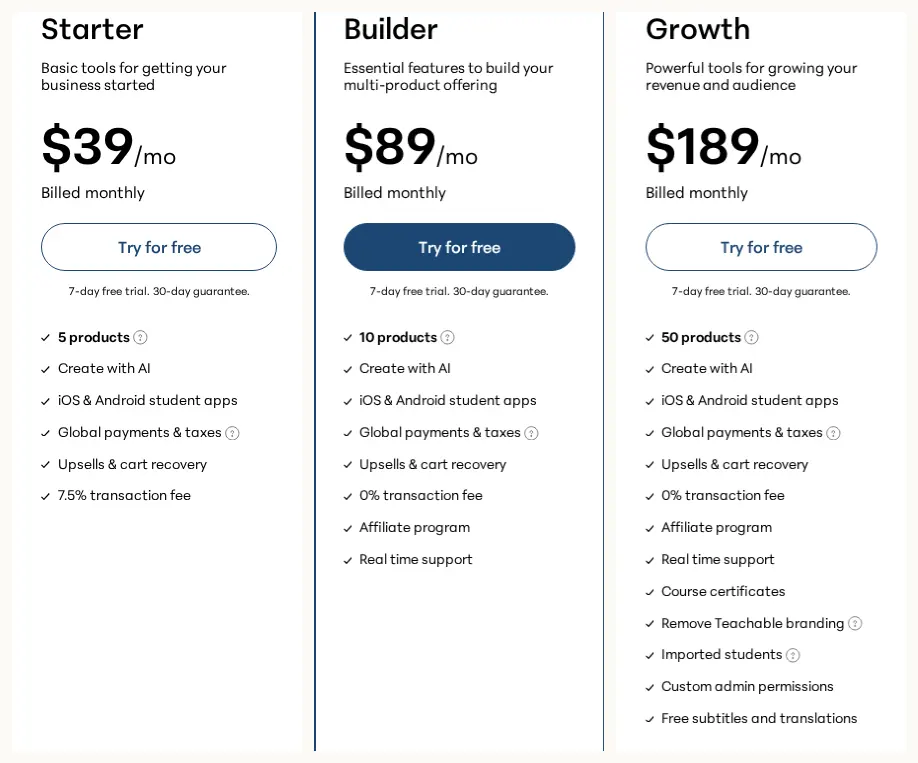
What Teachable Actually Charges a UK Business (in Dollars and Pounds)
Teachable's pricing page says all its prices are in US dollars. There's no sterling price. You pay a dollar amount and your bank or card converts it.
You may also see that students can pay in their local currency. That's about your learners' checkout, not about what you pay Teachable. Easy to mix up.
| Plan | Published products | Monthly billing | Annual billing (per month) | Annual billing (paid per year) | Teachable transaction fee |
|---|---|---|---|---|---|
| Starter | 5 | USD 39 (about £29) | USD 29 (about £22) | USD 348 (about £262) | 7.5% |
| Builder | 10 | USD 89 (about £67) | USD 69 (about £52) | USD 828 (about £623) | 0% on qualifying payment route |
| Growth | 50 | USD 189 (about £142) | USD 139 (about £105) | USD 1,668 (about £1,255) | 0% on qualifying payment route |
On annual billing, the headline figure is a monthly equivalent, but the whole year is charged in one go. Teachable shows savings of USD 120 on Starter, USD 240 on Builder and USD 600 on Growth.
The pounds on this page are estimates, and here's why that matters
We convert at the European Central Bank reference rate for 30 September 2026. Your bank won't use that rate. It uses its own, and may add a foreign transaction fee on top. So your statement will be close to our figures but rarely identical.
If you pay monthly, the sterling amount can drift each month as the exchange rate moves. If you pay annually, you convert once and that rate is locked for the year's service.
The 0% Fee Isn't the Whole Story: Two Charges Land on Every Sale
Teachable's FAQ says there are 0% transaction fees on Builder, Growth and Custom plans for those using teachable:pay or Monthly Payment Gateway, and 7.5% on Starter. It then adds that standard processing fees may still apply.
That last bit matters. Every sale can carry two separate charges:
- Teachable's transaction fee. This is Teachable's cut. It's 7.5% on Starter and 0% on Builder and Growth when you use the qualifying payment route.
- Payment processing. This is what it costs to actually move the money from your customer's card. Teachable's pricing page doesn't give a fixed rate, and we're not going to guess one.
So "0% fees" means "0% to Teachable", not "free payments".
Before You Compare Fees, Check These Two Plan Limits
A fee comparison is pointless if one of the plans can't run your business. Two limits do most of the ruling out.
The product limit, and the clever bit about what counts
Starter allows 5 published products, Builder 10 and Growth 50.
Teachable is specific about what counts as a product:
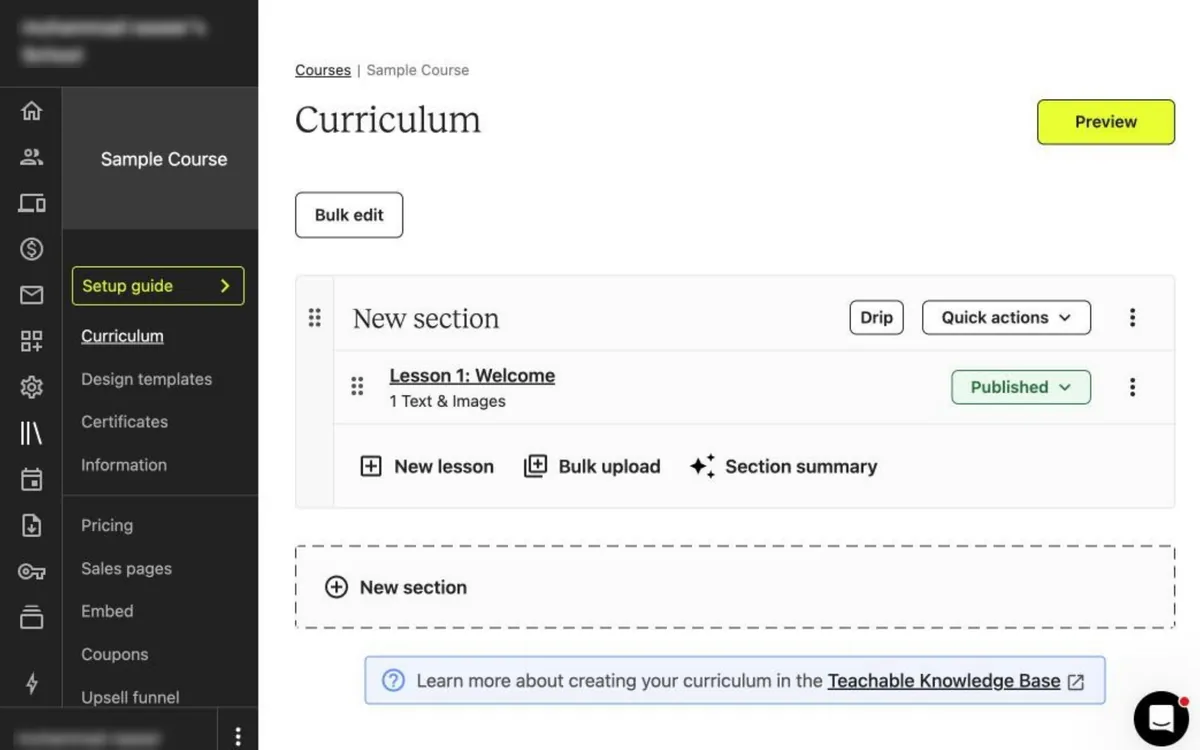
- A published course, coaching offer or digital download counts as one product, however many lessons or files it contains.
- Memberships and bundles do not count toward the limit.
- Unpublished drafts don't count either.
So a coach with three published courses, one coaching offer and one workbook has five products. That's Starter's full allowance.
Here's the useful part. Because drafts don't count, you can build your sixth course in the background without tipping over the limit. You only need the bigger plan on the day you publish. That gives you time to see whether sales justify it.
And because bundles and memberships don't count, packaging your existing products into a bundle won't eat into your allowance. (The individual published products inside it still count, so a bundle isn't a way to sneak past the limit. It just doesn't add to it.)
Admin seats: the limit people forget until they hire help
Teachable's comparison table shows 1 admin-level user on Starter and Builder, and 5 on Growth.
If it's just you, that's fine. But the moment you bring in a VA, a co-host or someone to handle student questions, you'll want to check whether they need admin-level access. Sharing your own login isn't a good workaround. It's a security risk and it muddles who did what.
What each step up actually adds
Builder, compared with Starter, adds:
- the 0% Teachable transaction fee (on the qualifying payment route)
- an affiliate programme
- real-time support
Growth, compared with Builder, adds:
- 5 admin-level users instead of 1
- course certificates
- removal of Teachable branding
- imported students
- custom admin permissions
- free subtitles and translations
All three plans list Create with AI, iOS and Android student apps, global payments and taxes, and upsells with cart recovery.
Look at "imported students" on that Growth list. If you're moving an existing audience over from another platform, that feature could decide your plan for you, at least while you migrate. Teachable says you can change plan any time from your school admin, with the new price charged at your next billing date. What it doesn't spell out in the material we reviewed is what happens to imported students if you later drop to Builder. If that's your plan, ask before you commit.
Similarly, if you issue completion certificates, Growth is the documented plan for them.
Our course platform requirements checklist helps you pin down your must-haves before you look at price.
Teachable Starter vs Builder: The Break-Even, Worked Out Step by Step
Right, the main event. Assuming both plans fit your business, which is cheaper?
We'll use three assumptions so the maths stays honest:
- every sale in the model carries Starter's 7.5% fee
- Builder qualifies for 0% through the right payment route
- card processing costs the same on both plans, so it cancels out
On monthly billing: about £502 a month
Builder costs USD 50 a month more than Starter (USD 89 minus USD 39).
The question is: how much do you need to sell before 7.5% of your sales equals USD 50?
USD 50 divided by 0.075 = USD 666.67 a month in sales (about £502).
Let's sanity check it either side:
- Selling USD 400 a month: Starter costs USD 39 plus USD 30 in fees = USD 69. Builder costs USD 89. Starter saves you USD 20.
- Selling USD 1,000 a month: Starter costs USD 39 plus USD 75 = USD 114. Builder costs USD 89. Builder saves you USD 25.
At USD 2,000 a month, Starter's fees alone would be USD 150. You'd be paying almost double Builder's entire price just in fees.
On annual billing: about £401 a month
Annual billing narrows the gap. On the monthly equivalents, Builder costs USD 40 more than Starter (USD 69 minus USD 29).
USD 40 divided by 0.075 = USD 533.33 a month, or USD 6,400 a year (about £401 a month, £4,817 a year).
So annual billing makes Builder worthwhile at a lower sales level. The catch is the upfront cash: USD 348 for Starter, or USD 828 for Builder, at the start of the year.
The one question to ask yourself honestly
The break-even uses your average month, not your best one.
If you sell in launches, you might have one month at USD 3,000 and five months near zero. On a launch month, Builder wins massively. On a quiet month, Starter wins slightly. What matters is the total across the year.
A simple way to check: add up what you expect to sell in the next 12 months, then compare with USD 8,000 (monthly billing, which is 666.67 times 12) or USD 6,400 (annual billing). Above that, Builder is very likely the cheaper plan, assuming it fits.
Starter versus Builder calculator (USD)
Free Trial and Refunds: The Upgrade Detail Most People Miss
Every Teachable plan advertises a 7-day free trial and a 30-day guarantee, and the FAQ describes a 30-day money-back guarantee. The pricing copy doesn't cover every checkout detail, so read the terms at checkout before starting a trial.
Teachable's refund article fills in the gaps. Refunds are available within 30 days of signing up for a new paid plan, or of upgrading to a higher plan. That covers monthly and annual subscriptions, and charges incurred during trial periods if you decide not to continue.
Notice the word "upgrading". The 30-day window applies to upgrades too. That's a useful safety net if you move from Starter to Builder and realise within the month it wasn't the right call. It isn't a loophole to lean on, though. Teachable says it can deny refunds in cases of abuse, such as repeated requests across multiple schools or consecutive months.
The conditions to remember:
- request the refund in writing within 30 days
- cancel your school plan first (Settings, then Billing)
- charges outside the window can't be refunded
Plans renew automatically. Cancelling takes effect at the end of the current billing cycle. On annual billing, cancelling stops the next renewal rather than ending your plan straight away, so diary that 30-day date.
Teachable VAT for UK Creators: Your Subscription and Your Sales Are Separate
This is where a lot of UK creators get muddled, so let's split it clearly.
VAT on your Teachable plan
Teachable lists the United Kingdom among the places where it collects VAT on plan purchases. If your billing address is in the UK, it says applicable VAT is added to your recurring subscription price.
So the USD 39 on the pricing page isn't quite what you pay. Budget for VAT on top.
If you're VAT-registered and enter a valid VAT number at checkout, Teachable says tax may not be applied, depending on local rules such as the reverse charge. Where tax is collected, your invoice shows the rate, the amount and Teachable's registration number.
VAT on the courses you sell
Your own sales are handled differently, and it depends on your payment route.
On Teachable Payments, Teachable says it calculates, collects and remits tax on product sales in multiple markets, including UK and EU VAT, but only where local laws require the platform to do so. The rate depends on your buyer's location and yours.
On a Custom Payment Gateway, you're responsible for collecting and remitting tax. For UK and EU VAT, Teachable says it calculates VAT at checkout and includes it in your payout. You then remit it to the tax authority yourself.
That's a real difference in how much admin lands on your desk. This isn't tax advice (Teachable's own articles say the same). If you're VAT-registered, ask your accountant how Teachable's collection fits with your returns.
What's Still Unknown Until You Check Your Own Account
Teachable's pages settle the dollar prices, the limits and the fee rules. These still depend on you:
- Payment processing rate. "Standard processing fees may apply" is all the pricing page says. Find your actual rate before working out margins.
- Your real sterling cost. Our pounds are estimates. Your bank's rate and fees decide the true figure.
- Payment route eligibility. Confirm your UK business can use the route that unlocks Builder's 0% fee.
- VAT treatment. Check the VAT line on your subscription invoice, and how tax on your sales works for your chosen gateway.
Who Each Teachable Plan Suits Best
Starter tends to suit you if:
- you have five or fewer published products
- you're the only person who needs admin access
- your sales average under about £500 a month (monthly billing) or £400 (annual)
- you don't need an affiliate programme or certificates
Builder tends to suit you if:
- you're selling consistently above the break-even
- you want affiliates or real-time support
- you have up to 10 published products
Growth tends to suit you if:
- you need more than one admin-level user
- you issue certificates
- you're importing existing students
- you want Teachable branding removed
To compare Teachable with other platforms using your own figures, try our course platform cost calculator.
Teachable Pricing UK: Quick Answers
Does Teachable charge in pounds?
No. Teachable says all its prices are in US dollars. Your bank or card converts the charge.
What is Teachable's 7.5% fee?
It's Teachable's transaction fee on the Starter plan. Builder and Growth have a 0% Teachable transaction fee when you use teachable:pay or Monthly Payment Gateway. Card processing fees may apply on all plans.
When is Teachable Builder worth it over Starter?
When both plans fit, Builder becomes cheaper at about USD 666.67 a month in sales on monthly billing (about £502), or USD 533.33 a month on annual billing (about £401).
Do bundles count towards Teachable's product limit?
No. Teachable says memberships and bundles don't count, and nor do unpublished drafts. Each published course, coaching offer or digital download counts as one.
Does Teachable add VAT for UK customers?
Teachable says it adds applicable VAT to subscriptions for UK billing addresses. A valid VAT number may change that, depending on local rules such as the reverse charge.
Can I get a refund if I upgrade and change my mind?
Teachable's refund article says refunds are available within 30 days of upgrading to a higher plan, with conditions. You must cancel first and request in writing.
Related UK Buyer Guides
- UK course platform costs. The full picture of running costs, from fees to switching work.
- Podia pricing for UK buyers. A similar break-even between Podia's Mover and Shaker.
- Kajabi pricing in the UK. Why your payment route decides the cheapest Kajabi plan.
- UK buyer guides. All our UK guides in one place.
Sources
Prices, terms and exchange rates change. Check the official pages before buying. This page contains no affiliate links.
- Teachable pricing page (checked 30 September 2026): https://www.teachable.com/pricing
- Teachable Help Center, Request a Refund on Your School: https://support.teachable.com/en/articles/11682420-request-a-refund-on-your-school
- Teachable Help Center, Taxes on School Plans: https://support.teachable.com/en/articles/12038399-taxes-on-school-plans
- Teachable Help Center, How Teachable handles tax: https://support.teachable.com/en/articles/15663382-how-teachable-handles-tax
- European Central Bank reference rates (EUR/USD 1.1355, EUR/GBP 0.85463, 30 September 2026; the USD to GBP cross rate is EdTechKit's calculation): https://www.ecb.europa.eu/stats/eurofxref/eurofxref-hist.xml